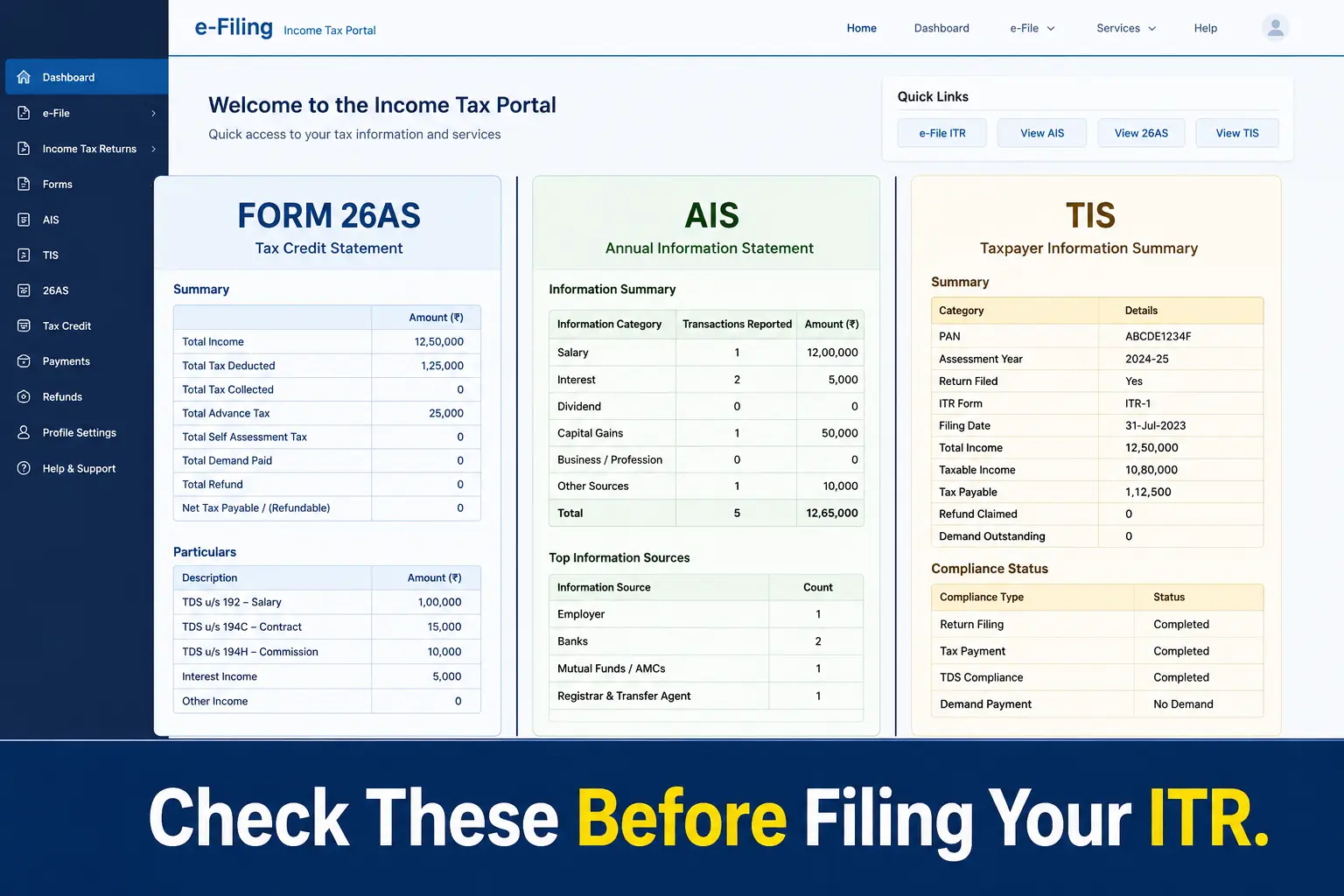
You Have Form 16. But That’s Not Enough to File ITR
Every June, the same thing happens in PSU offices across India. Form 16 arrives. Someone collects it, hands it to the person who “knows these things,” and the ITR gets filed in 20 minutes. Job done. Or so it seems.
Form 16 only tells one part of your story. It shows your salary income and the TDS your PSU deducted from it. That’s it. It does not show your savings account interest, your FD returns, your dividends, or any other income the IT department already knows about.
Here’s the problem. The Income Tax Department is not looking only at your Form 16. They have access to your AIS — a detailed statement that captures every financial transaction reported against your PAN by banks, mutual funds, and other institutions. If your ITR does not match what is in AIS, a mismatch notice can follow.
This is not a scare tactic. It is a simple gap that most PSU employees don’t know exists. Three documents — Form 26AS, AIS, and TIS — sit on the Income Tax portal, ready to be checked before you file. Most people never open them. This article shows you exactly what each one is and what to check before you hit submit.
What Is Form 26AS — And Why PSU Employees Must Check It
Form 26AS is your official tax credit statement maintained by the Income Tax Department. Think of it as your tax passbook. It shows every rupee of tax deposited against your PAN — whether it was TDS deducted by your PSU on your salary, TCS collected on any purchase, advance tax you paid yourself, or any refund issued to you.
You can access it directly from the Income Tax e-filing portal at incometax.gov.in. Log in, go to the AIS section, and you will find Form 26AS listed there along with AIS and TIS.
Here is why it matters specifically for PSU employees. Your HR or accounts department files a quarterly TDS return on your behalf. Once that return is processed, the TDS amount gets reflected in your Form 26AS. If there is even a small data entry error — a wrong PAN, a mismatched amount — your Form 26AS will not match your Form 16. And when you claim that TDS credit in your ITR, the department will reject or adjust it.
This is the document that decides whether your refund gets processed smoothly or gets stuck. Form 16 is issued by your PSU. Form 26AS is maintained by the government. Always trust Form 26AS over Form 16 when there is a difference between the two.
What Is AIS (Annual Information Statement) — And Why It Sees More Than Form 16
AIS is the most detailed financial statement available to you on the Income Tax portal. While Form 26AS focuses on tax credits, AIS goes much wider. It captures every financial transaction that any bank, institution, or intermediary has reported against your PAN to the Income Tax Department.
For a typical PSU employee, AIS will show your salary income, savings account interest, FD interest, dividends received, and mutual fund transaction details — including purchases and redemptions. Even if you did not redeem a single unit, the purchase value still gets reported. If you bought or sold stocks during the year, those transactions appear here too.
This is where most PSU employees get caught off guard. They forget about the ₹3,000 interest credited by their savings account. They ignore the dividend their mutual fund paid out. None of this appears in Form 16. But all of it appears in AIS — and the IT Department can see it whether you report it or not.
AIS also gives you a very useful feature. If any entry in AIS is wrong — say a transaction that does not belong to you, or a figure that is incorrect — you can submit feedback directly on the portal to flag it. Do this before you file your ITR, not after.
What Is TIS — The One-Page Summary You Should Not Ignore
If AIS is the full detailed register, TIS is the summary page at the front. TIS stands for Taxpayer Information Summary. It takes all the transactions listed in your AIS and consolidates them into category-wise totals — salary, interest, dividends, mutual funds, and so on.
You do not need to calculate anything from TIS. The portal does it for you. When you open your pre-filled ITR on the Income Tax portal, much of the income data that appears automatically comes from TIS. This is why it matters — if TIS has a wrong figure, your pre-filled ITR starts with a wrong figure.
Here is something most PSU employees miss. When you submit feedback on a wrong entry in AIS, the corrected figure flows into TIS automatically. TIS then shows two numbers — the value as originally reported and the value after your feedback. Always check that TIS reflects your corrections before you finalize and submit your ITR.
Think of the three documents this way. AIS is the full picture. TIS is the clean summary of that picture. Form 26AS is the legal proof of tax already paid. You need all three to file a complete and accurate ITR.
AIS vs Form 26AS vs TIS: The Simple Difference Every PSU Employee Needs to Know
Most PSU employees hear these three names and assume they are the same thing with different labels. They are not. Each one does a different job, and confusing them is one of the most common pre-filing mistakes.
Form 26AS is your tax credit statement. It answers one question: how much tax has already been deposited against your PAN? TDS from your PSU salary, any TCS, advance tax you paid — all of it is here. This is the document that decides your refund or your tax dues when you file.
AIS is your complete financial picture. It answers a different question: what does the Income Tax Department know about your income and transactions? Salary, interest, dividends, mutual fund activity, stock transactions — anything reported by any institution against your PAN lands here. It is far wider than Form 26AS.
TIS is the clean summary of AIS. It takes the detailed transactions in AIS and groups them by income category. This is what pre-fills your ITR on the portal. If TIS is wrong, your pre-filled return starts wrong.
Here is the one rule that matters most. For claiming TDS credit in your ITR, Form 26AS is the legally binding document. If TDS appears in AIS but is missing from Form 26AS, you cannot claim that credit yet. You must first ask your PSU accounts or HR department to correct the TDS return. Only after Form 26AS is updated can you safely claim that credit.
What Exactly to Check in These Documents Before Filing
Do not open these documents just to glance at them. Open them with a purpose. Here is exactly what a PSU employee needs to verify before filing ITR.
In Form 26AS, check the TDS amount shown against your PAN. Match it exactly with the TDS figure in Part A of your Form 16. If the numbers differ even by one rupee, do not file until you find out why. Also check if any other TDS or TCS entry appears that you were not expecting — a bank FD, a property transaction, anything unusual.
In AIS, start with your salary figure and confirm it matches Form 16. Then look at every other entry carefully. Savings account interest, FD interest, dividends, mutual fund transactions, stock purchases or sales — all of it will be listed here. If any income appears that you have not accounted for in your ITR, you must include it. If any entry is wrong or does not belong to you, submit feedback on the portal immediately.
In TIS, check the category-wise totals. These are the figures that will pre-fill your ITR. Make sure the salary total, interest total, and any other income category match what you have independently calculated. Do not accept pre-filled figures blindly without verifying them against your own records.
One final check. If you have only salary income and no other transactions during the year, this process takes under 15 minutes. There is no excuse to skip it. A mismatch found before filing takes minutes to resolve. A mismatch found after filing can take months.
What Happens If There Is a Mismatch — And What to Do
Mismatches are more common in PSUs than most employees realise. And they are not always caused by big errors. Sometimes it is something as simple as a name.
In my PSU, I have seen a real case where two employees shared the same name — both named Rahul Sharma, both in the same organisation, but with different PAN numbers. Their TDS entries got mixed up during data entry. One employee’s TDS was credited against the other’s PAN. Neither of them knew until they checked Form 26AS. A similar problem can happen with PAN numbers that look nearly identical — one digit or letter different — where a data entry mistake routes the credit to the wrong person entirely.
If you discover a mismatch, do not panic and do not file your ITR immediately hoping it will sort itself out. It will not. First, inform your PSU accounts or HR department in writing. The deductor — your PSU — needs to file a corrected TDS return with the right PAN and the right amount. Only after that correction is processed will Form 26AS reflect the right figure.
If the mismatch is in AIS and not in Form 26AS — say a transaction that does not belong to you — use the feedback option in AIS on the Income Tax portal to flag it as incorrect. Submit your feedback, keep a record of it, and then proceed with filing.
Never file your ITR with a known mismatch and hope for the best. The IT Department’s system will catch it. A notice is far more stressful than a short delay in filing.
One Thing Changing from Next Year: Form 26AS Becomes Form 168
If you have been filing ITR for a few years, you know Form 26AS well. But starting from FY 2026-27, the government is renaming it. Under the new Income Tax Act 2025, which came into effect from April 1, 2026, Form 26AS will be replaced by Form 168.
This is not a change in how tax works. It is a renaming exercise as part of India’s broader tax system modernisation. The purpose remains the same — it will still be your official tax credit statement. But the name, the form number, and some of the structure will be different.
Here is what matters for you right now. For the ITR you are filing this year — for FY 2025-26, Assessment Year 2026-27, due by July 31, 2026 — Form 26AS still applies. Nothing changes for your current filing. You access the same portal, check the same document, follow the same process described in this article.
Keep this in mind for next year. When you sit down to file ITR for FY 2026-27, the document you will look for is Form 168, not Form 26AS. The name will be new but the habit of checking it before filing must remain exactly the same.
The Step-by-Step Checklist for a PSU Employee Before Filing ITR
This is the section to bookmark. Before you file your ITR this year, go through these steps one by one. Do not hand your Form 16 to anyone — whether a CA, a colleague, or a portal — without doing this first.
Step 1: Collect your Form 16. Your PSU accounts or HR department issues this by June 15 every year. Check Part A for TDS details and Part B for salary breakup. If you have not read our earlier guide on how to read Form 16, start there first.
Step 2: Log in to the Income Tax portal. Go to incometax.gov.in. Log in using your PAN and password. Navigate to the AIS section under the e-File menu.
Step 3: Download and check Form 26AS. Match the TDS amount in Form 26AS with Part A of your Form 16. They must match exactly. If they do not, contact your PSU accounts department before filing.
Step 4: Open AIS and review every entry. Check your salary figure, savings interest, FD interest, dividends, mutual fund transactions, and stock activity. If any entry is wrong or unfamiliar, submit feedback on the portal immediately.
Step 5: Check TIS for category totals. Confirm that the pre-filled income figures in TIS match your own calculation. Do not accept pre-filled ITR data without verifying it here first.
Step 6: Resolve all mismatches before filing. Any mismatch between Form 16, Form 26AS, and AIS must be resolved before you submit. A delayed filing is far better than a wrong filing.
Step 7: Now file your ITR. Only after all six steps above are complete should you proceed to file. Whether you file yourself or take help from a colleague, make sure these checks have been done.
One last thing. The person in your office who files everyone’s ITR in 20 minutes is probably skipping most of these steps. That is his risk to take. Do not make it yours.